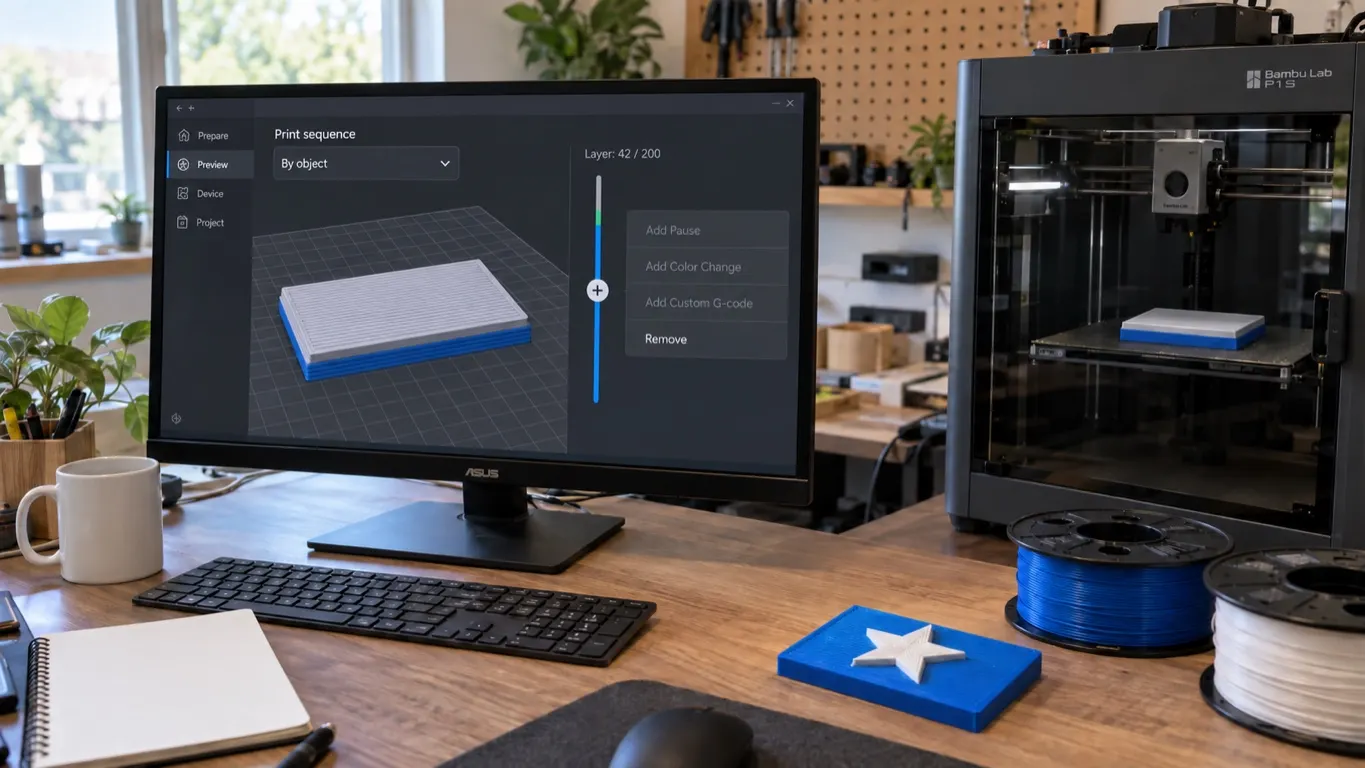
If you right-click the + button beside the layer slider in the Preview tab of Bambu Studio or Orca Slicer, the menu opens, but Add Pause is greyed out and cannot be clicked, then Print sequence in the process settings is most likely set to By object. In that mode every add command in the slider menu is disabled. Set it to By layer, re-slice, and Add Pause becomes available.
The quick route:
- In the process settings panel on the Prepare tab, open the Others section and find the Special mode heading.
- Set Print sequence to By layer.
- Re-slice the model (Slice).
- Switch to Preview, right-click the + button and pick Add Pause.
If the option is still greyed out after that, the plate's own setting and the checklist further down are next.
How a pause is added, which layer it stops at, and how it differs from a filament change are covered in the pause-at-layer article; the steps are not repeated here. This article has one subject: the option is in the menu but cannot be clicked.
The symptom
The goal is usually a classic one: give the raised lettering on top of the part a different color by stopping the print at that layer and swapping filament by hand.
The fact that the menu opens matters. If it opens, the interface is working; the problem is not a missing button but the slicer refusing, at that moment, to add a command to that layer. And it is not only Add Pause that is greyed out, but every add command in that menu; in a fresh project all four menu lines are available. The question to ask is not "where is the menu" but "why is the slicer not accepting these commands right now".
Orca is forked from Bambu Studio, so both have the same menu, the same slider and the same Print sequence setting, and the checklist below applies to both. The setting is in the process settings, not in the printer profile; the make of your printer does not change where to look.
The cause: Print sequence set to By object
The factual part is simple. In By object printing the printer finishes the parts on the plate one at a time, and does not move to the next until one is complete; while this mode is selected, the add commands in the slider menu are disabled. In By layer printing all parts rise together layer by layer and the pause can be written at that layer; for now that is the route that works. Choosing which object prints first in By object mode is covered in the wall and object order guide.
Why the slicer behaves this way is less settled. The usual explanation is that it cannot tell which object the pause belongs to. That is an interpretation, and it does not quite hold up: in By object the slider counts layers cumulatively from object to object, so the selected layer does correspond to a single point. A 10-layer model plus a copy gives 20 layers on the slider, and layer 15 is the middle of the second object; the preview can draw that point and even shows its G-code, yet the pause cannot be written there. That is why the behavior is also read as a limitation of the slicer, even a bug, with requests for the pause to work in By object as well.
The setting lives under the Special mode heading on the Global tab: in Bambu Studio and Orca that heading sits under the Others section of the process settings panel on the Prepare tab, and the field is Print sequence. Set it to By layer, re-slice the model, switch to Preview and right-click the + button.
There is also a plate level. Each plate's own settings open from the gear icon in the plate's corner, and there is a Print sequence field there too. If the plate's own setting has not been left at default, it takes precedence over the global one. If the option is still greyed out after setting the global value to By layer, check the gear of the plate you want the pause on.
Still greyed out: check in order
Each takes a glance to check; go through them in order.
| Check | Why you are looking |
|---|---|
| Did you right-click the + button | The options may only be enabled while the mouse is over the plus-marked dot on the slider; it is the first thing to check |
| The plate's own Print sequence setting | The gear setting above; in a multi-plate project select the plate you want the pause on and check it |
| Has the model been re-sliced | A precondition of changing the setting: if Preview shows an old slice, the slider works on that slice; after changing Print sequence, hit Slice again |
The slider position is not on this list. Picking a layer with Jump to layer and trying again leaves the option greyed out, so dragging the slider down from the top is no fix either.
If you must print by object
In By object printing every add command in the slider menu is greyed out together. Add Custom G-code, used for custom G-code at a layer, and the filament change entry (Change Filament in the menu, called Add filament change in the earlier articles), used for color changes without an AMS, are added from the same menu, so both are blocked by the same setting; trying them as alternatives is wasted time. That leaves two routes.
Change the setting and re-slice. This is the real fix. If you genuinely want the parts printed one at a time there is one more route: put each object on its own plate, leave the plates' Print sequence on By layer, and add the pause to the plate concerned. The price is that the plates print one after another as separate jobs; what By object does within a single job, this route does not.
Pause from the printer's screen. The printer's own Pause button exists too, but it stops the head wherever it happens to be; it does not land on a layer boundary, and the color line can fall mid-layer.
The second one does not remove the reason the option is greyed out. So look at Print sequence first, then walk through the table; think of the on-printer pause only for jobs where you are standing at the printer anyway.