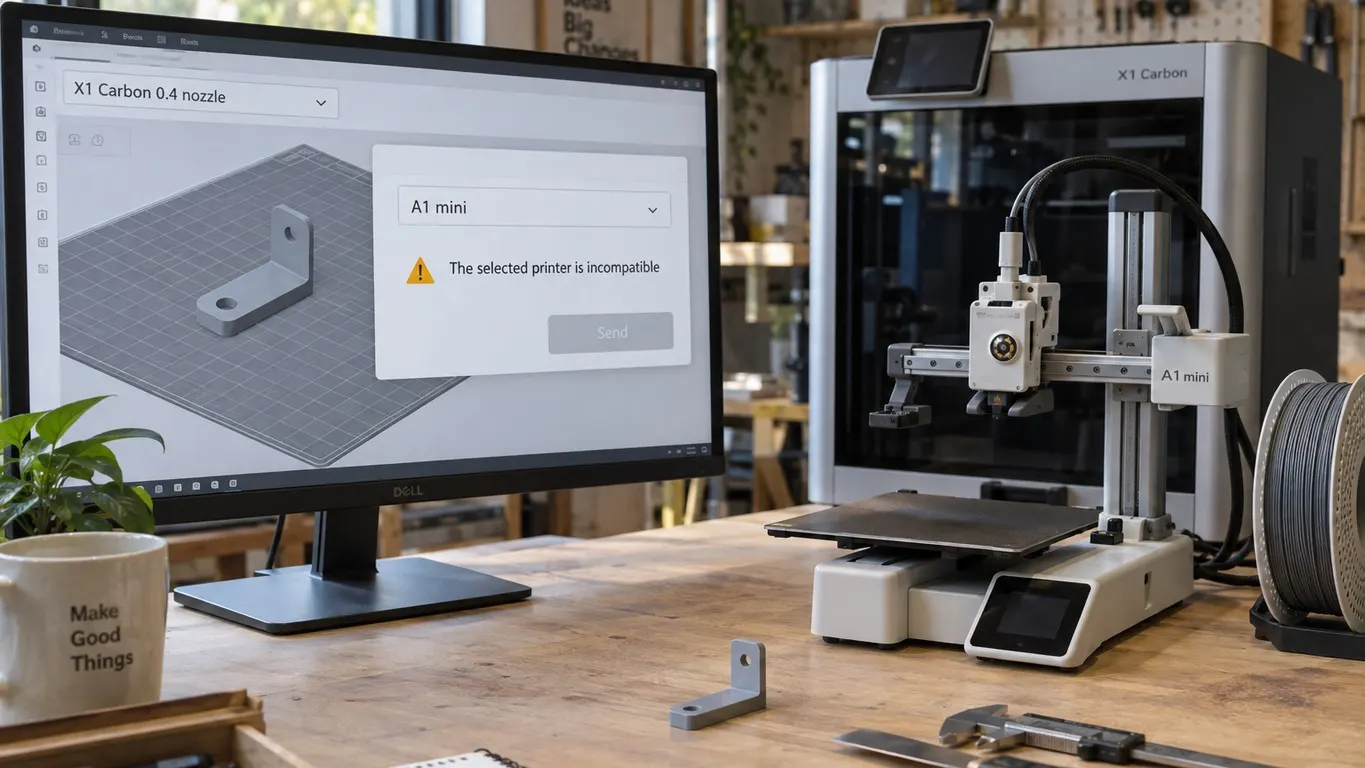
You hit Print, the device list comes up, and the Send button is dead. In its place there is a line of warning text: The selected printer is incompatible with the chosen printer presets on older builds, or The selected printer (X) is incompatible with the print file configuration (Y) on current ones. Nothing about the model is wrong. It fits the plate, it sliced, and the printer is online.
The Bambu Lab forum thread "Not compatible printer", opened in November 2023, is that exact moment. The person who posted it owns an A1 mini and was seeing the message everywhere, including on Bambu's own sign generator and on files pulled from MakerWorld. The first reply closes it in one line:
You say that you have the A1 Mini, but you have the 'X1 Carbon 0.4 nozzle' set as your printer type.
The accepted answer adds the practical half: you can use any of Bambu's 3mf files, but you have to use the dropdown to pick your own printer. The poster confirms the fix in the next post. Nine months later, in August 2024, a second user lands in the same place and the thread starts over.
Which sentence are you actually looking at
Search the web for the wording in that thread and you may not find it in your own copy of Bambu Studio, because the text has been rewritten twice. Comparing the tagged releases in Bambu Studio's open source repository lays the sequence out.
| Text on screen | Which window | Which version |
|---|---|---|
| The selected printer is incompatible with the chosen printer presets. | Send to Printer storage | Through 1.8.4 the print window said this too; today it is only here |
| The selected printer (X) is incompatible with the chosen printer profile in the slicer (Y). | Send print job | 1.9.0 through 1.10.x |
| The selected printer (X) is incompatible with the print file configuration (Y). Please adjust the printer preset in the prepare page or choose a compatible printer on this page. | Send print job | 2.0.0 onward |
The release tags carry the dates: 1.8.4 in January 2024, 1.9.0 as a public beta in March 2024 with the stable 1.9.1 following in May, and 2.0.0 in March 2025. So the 2023 thread was looking at the first row in the print window; the same check only reached the Send to Printer storage window a couple of weeks later, in 1.8.1. The current print window is more generous, because it prints both names: the first one in parentheses is the machine you picked, the second is the model the file was prepared for. Read those two names and you have your answer before you read anything else.
What the check compares
The function behind it takes two values. One is the model id of the printer preset currently selected in the slicer, read by matching the preset's printer_model name against the vendor profile and taking that model's id. The other is the model reported by the physical machine you selected in the print dialog. Equal, and you are through. Different, and the program checks the target machine's list of models it will accept; if the source model is not on that list either, sending is blocked.
What that leaves out matters as much as what it includes. Plate size is not in the comparison, nor is the geometry, the filament, or where the file was downloaded from. Two model names, nothing else. A model that sits happily inside the build volume will still be refused, which is precisely what confused the person who opened the thread.
A preset belonging to one printer model is also the hinge of a different annoyance: change the selected printer and the presets you saved yourself drop out of the list. I went through that in the preset article. There you lose your profiles; here you lose the Send button.
Which printers will take each other's files
The acceptance lists are not guesswork either. Each model ships a device configuration file in the repository with the other models it will accept:
| Machine | Models it accepts besides its own |
|---|---|
| X1, X1 Carbon, X1E, P1P, P1S | These five accept each other's files |
| H2D and H2D Pro | Each other only |
| H2C | Two configuration ids in the repository, each accepting only the other |
| A1, A1 mini, P2S, H2S, X2D, A2L | Empty list: their own model only |
The A1 mini's list being empty is why the forum case had no way out: with an X1 Carbon preset selected, nothing gets through to an A1 mini. The other direction is shut as well, because the list lives on the receiving machine and an X1 Carbon's names X1, X1E, P1P and P1S, not the A1 mini. Inside that group of five files travel freely; across its edge they do not travel at all.
Where the dropdown is, and what if yours is not in it
By August 2024 the question in the thread had narrowed to exactly this: which dropdown. The user who answered wrote that it is at the top where it says "printer", near the very top under the icon that looks like a house, and posted a screenshot.
The source puts it in a fixed place. The printer block is the first block in the sidebar: a title bar with a printer icon and the word Printer, and immediately below it a thumbnail of the machine next to the preset dropdown. The process and object parameters sit lower down in the same sidebar, beneath the printer and filament blocks. On current versions the sidebar can be docked to either side of the window, but the order of the blocks does not move. The entries carry the nozzle size in their names, so what you are picking looks like Bambu Lab A1 mini 0.4 nozzle.
If your machine is not in that list at all, the tenth post in the thread has the missing step. Two entries sit at the bottom of the same dropdown: Select/Remove printers(system presets), which opens the setup wizard's printer page where you make the Bambu models you own visible, and Create printer, for defining one that is not on offer. Chasing a non-Bambu machine through that second entry is a longer story, and where Bambu Studio stops is in the non-Bambu printer article.
The message since 2.0.0 also names the second route itself: adjust the printer preset in the prepare page, or choose a compatible printer on this page. Picking the right machine from the device list in front of you works just as well, provided that machine really matches the file.
There is a third route since 2.0.0. Open a 3mf project while a printer is connected and, if that machine's model does not match the project's preset, the program pops a Tips dialog naming the connected model and offering Switch now or Later. Switch now changes the preset for you. The same dialog also fires on a nozzle diameter mismatch, and only when the connected machine is the selected one. Dismiss it with its remember setting and it never comes back.
The nozzle warning is a different message
Nozzle size gets named in the same breath as this warning, and the forum answer mentions it too, but in the source these are two separate checks. The incompatible-printer check looks at model ids only; nozzle diameter never enters it.
The nozzle has its own test: the diameter the file was sliced with, together with the flow type on machines that report one, is compared against the nozzle actually installed. When that fails the sentence is different again: The nozzle type doesn't match. Please re-slice. The fix there is not a different printer but the right nozzle variant in the preset, followed by slicing again. You can meet both messages in one session, since a preset name carries the model and the nozzle size together and one wrong pick breaks both.
After the message clears
The accepted answer does not stop at the dropdown. Most of the time, it says, you then have to resize or move the print onto the plate. That follows from the fix rather than spoiling it: switching printers switches build volumes, and a layout arranged for an X1 Carbon does not land in the same spot on an A1 mini's smaller bed. Moving, rotating and scaling are covered in the rotate and scale article.
One more thing, and it is why the August 2024 poster ended up at a computer. They write that they could not do this from the iPhone app and had switched to the PC app; the person answering says that in Handy you can only change the printer, and the filament to a similar type or color. Neither post says outright whether a preset picker exists there. That is a 2024 observation about Handy rather than a claim about the app as it stands now, but it is worth knowing before you spend an evening hunting for a preset picker on a phone.
Confusing this with the load-time notice is easy, so it is worth separating them: The 3mf is not from Bambu Lab, load geometry data only is about a file produced outside Bambu, covered in the 3mf notice article. This one usually fires on Bambu's own 3mf, where the printer settings are read perfectly well and simply belong to somebody else's machine. Line the two names up and the button comes back.